
Assignment #2
Concepts involved:
Self-critique
Graphic resonance
Research
Design Process
Presentation
Conceptual problem solving
Step 1
In this assignment, you will be in groups of four. Your group will choose one of the following words.
Change, tension, RESoLVE, SERENITY, and ANXIOUS
Each individual is responsible to come up with 20 DIFFERENT ideas and sketch them out in 2 inch squares. The appointed group leader will make sure no two sketches in the group are alike.
DUE OCTOBER 28th
Sketches need to posted on white mat board as 2 inch squares. No two sketches can be alike. Please check with your group before Tuesday's class. I've provided a lot of room for creativity. I encourage you to use various media including India Ink, charcoal, water color, pastel, fabric, etc.
Step 2
In the final step, (based on your in-class critique and group critique) develop the best idea using Photoshop. You will present your ideas together on black mat board. As a group, you must research the essence of that idea and communicate it verbally, using no less than 120 words, and no more than 150 words. Your research should be submitted in addition to your illustrations.
For the final critique, each individual will present their final illustration on black mat board.
NOVEMBER 6th - Final Critique
Friday, October 24, 2008

Monday, October 20, 2008
Bleeds and Presenting your magazine cover...
To add bleeds you need to:
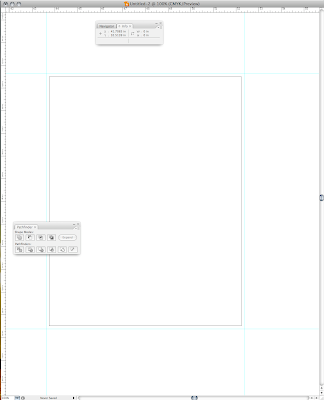
1) Set up 1/8" guides on your artboard
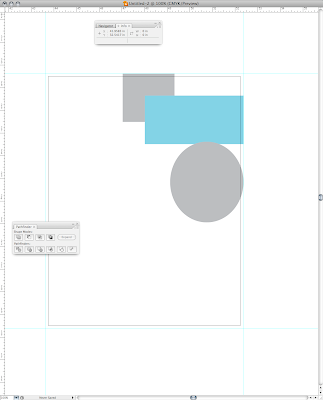
2) Your artwork should extend 1/8" past the final dimension of your magazine cover
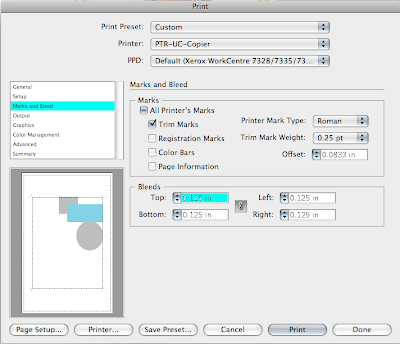
3) When you're ready to print, click on 'Marks & Bleeds'
4) Check 'Trim Marks'
5) Change bleeds to '0.125 in'
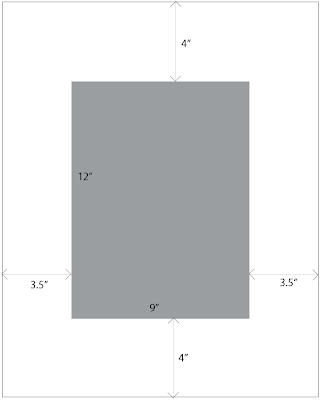
When you're placing your final magazine cover on black mat board, you need to:
1) Measure the width of your cover.
2) Subtract that measurement from the width of your mat board (in this case it is 16")
3) Divide that number by 2 and you will have the distance you need between the edge of your cover to the edge of your mat board.
Hope this helps!
1) Set up 1/8" guides on your artboard

2) Your artwork should extend 1/8" past the final dimension of your magazine cover

3) When you're ready to print, click on 'Marks & Bleeds'
4) Check 'Trim Marks'
5) Change bleeds to '0.125 in'

When you're placing your final magazine cover on black mat board, you need to:
1) Measure the width of your cover.
2) Subtract that measurement from the width of your mat board (in this case it is 16")
3) Divide that number by 2 and you will have the distance you need between the edge of your cover to the edge of your mat board.

Hope this helps!
Art Supplies, SmArt Supplies...

I've been asked a few times where to get the necessary art supplies for my class. Here's the answer to all of your problems. There is a store in Capitol Hill called Utrecht. Check them out online at Utrechtart.com
Brian
Wednesday, October 15, 2008
MORE examples...
Here are a couple more magazine covers for you to get some ideas from.

Ok, so there are some obvious rules broken here, but she was able to pull it off because it fit the subject matter of the magazine and added to the authenticity of the piece.

Ok, so there are some obvious rules broken here, but she was able to pull it off because it fit the subject matter of the magazine and added to the authenticity of the piece.

Monday, October 13, 2008
Magazine Cover Samples

Here's the first example I received from a previous student of mine– Karin Bretz. If you know her and/or see her around you might try to get some advice on how she executed this particular assignment.
Friday, October 10, 2008
Upcoming Illustrator CS4 Features
IN CASE any of you are interested I found what will be featured in Illustrator CS4! Trust me, there will be a lot of new features that will enhance your experience in the program AND your design work. vectips.com
Illustrator Tutorials online
A great resource for you is vectips.com. It has Illustrator tips, tricks, and tutorials.
Please wait patiently while I'm waiting to hear back from the students I asked to have their magazine cover posted on the blog. I'm trying to get 4 magazine covers that show the unique personality of each individual and an effective use of the pen tool.
Please wait patiently while I'm waiting to hear back from the students I asked to have their magazine cover posted on the blog. I'm trying to get 4 magazine covers that show the unique personality of each individual and an effective use of the pen tool.
Subscribe to:
Posts (Atom)


 Posts
Posts


